
My vinyl record collection has gotten out of hand… well, not really. Standing tall at 36 records, it can comfortably sit on one half of one of my shelves. But, I’ve already noticed two things:
- I want to start catalogue-ing it early
- I can’t truly quickly find something I need
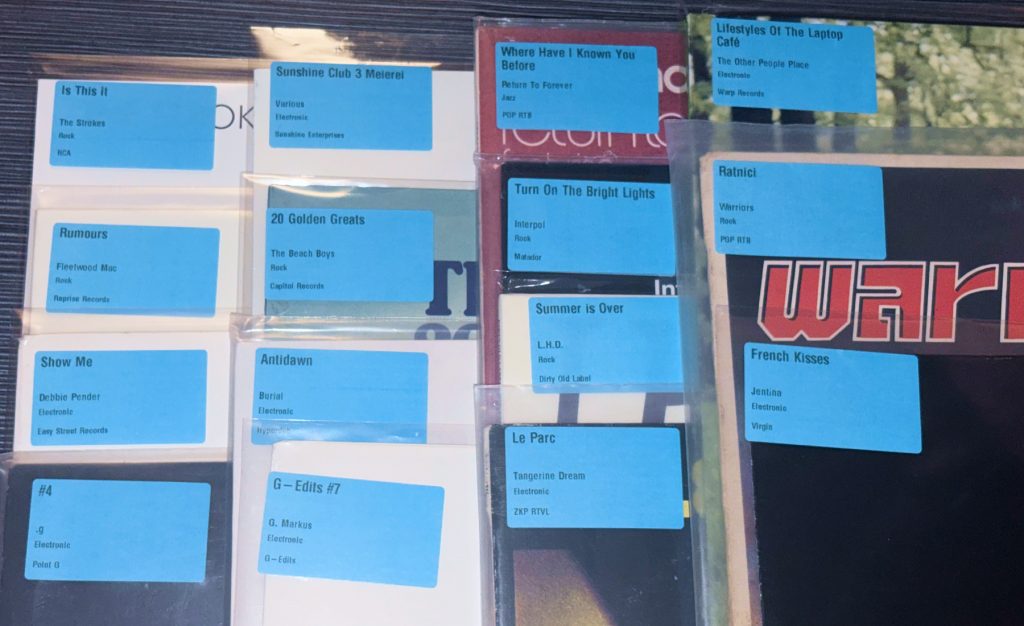
This gave birth to an idea to create a simple program which will automatically create and print labels to place in the upper right corner on the plastic sleeve of each record (of course not on the cardboard itself, I’m not a psychopath). Here’s how it works, see below for the GitHub repo with the full code.
Discogs API
Discogs is an amazing website used to catalogue all music releases ever, and it also acts as a marketplace and a place to take note of your own collection or share (brag about it) it with friends. I already had a Discogs account so I just quickly catalogued all of my releases.
Then, using a Python script interacting with their well made API via the Python package, I was able to retrieve this list of all the records I own and have logged in Discogs, here is a code sample of how this can be done:
import discogs_client

client = discogs_client.Client(
    "VinylRecordLabelGenerator/1.0", user_token="your_token_here"
)

collection = client.user("your_username").collection_folders[0].releases

for item in collection:
    release = item.release
    print({
        "title":  release.title,
        "artist": release.artists[0].name,
        "genre":  release.genres[0],
        "label":  release.labels[0].name,
    })
Zebra Printer
At work, I’ve often interacted with industrial Zebra printers. They’re reliable and work by sending them a string via USB Serial communication. They then interpret this string when printing the label to create the final design. The Zebra Programming Language (ZPL) is hard to understand at first. A good trick is to use their Zebra Designer app to easily create a template design and then just replace the text (or barcode data) you want on the label programatically!
In zpl_template.py is the exact ZPL code being modified with each label’s data:
# Template to print a label with artist name, genre and record label

    zpl = f"""
^XA
^MMT
^PW{PW}
^LL{LL}
^CI28
^LH0,0

^FO{MARGIN},{MARGIN}
^A0N,36,36
^FB{BLOCK_W},2,4,L,0
^FD{title}^FS

^FO{MARGIN},{MARGIN + 100}
^A0N,26,26
^FB{BLOCK_W},1,0,L,0
^FD{artist}^FS

^FO{MARGIN},{MARGIN + 140}
^A0N,22,22
^FB{BLOCK_W},1,0,L,0
^FD{genre}^FS

^FO{MARGIN},{MARGIN + 190}
^A0N,22,22
^FB{BLOCK_W},2,4,L,0
^FD{label}^FS

^PQ1,0,1,Y
^XZ
""".encode("utf-8") # Encode to UTF-8 to make sure it gets printed correctlyBringing it all together
Now, iterating through the list of records in one’s collection, we can replace the placeholder strings and send the ZPL data to the printer via USB and print all of the labels! Here’s a code snippet which summarises how it works:
from zebra import Zebra
from zpl_template import build_label_zpl

z = Zebra()
z.setqueue(z.getqueues()[0])  # select the first available printer
z.setup()

for record in collection:
    zpl = build_label_zpl(
        title=record["title"],
        artist=record["artist"],
        genre=record["genre"],
        label=record["label"],
    )
    z.output(zpl)  # send label to printer via USB
View full project on GitHub
github.com/problemindustries/Vinyl-Record-Label-Generator
View on GitHub